To activate your Cerely profile and access the mobile app, follow these steps:
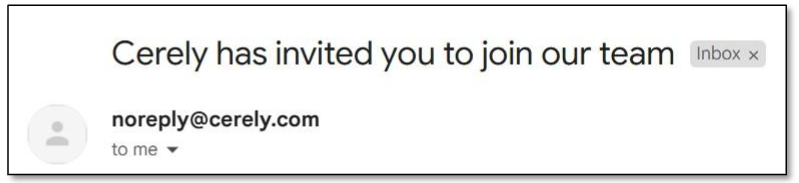
1. Check your email inbox for an invitation email from Cerely with the subject:
"Cerely has invited you to join our team."
2. If the email isn’t in your inbox, check your Spam or Junk folders.
Important: If found in Spam or Junk, move the email to your main inbox before proceeding.
3. The email contains your username and password, which you will use to log in after downloading the app
4. Click the Activate Account button in the email to begin activation
5. You’ll be redirected to a screen that displays Account Activation
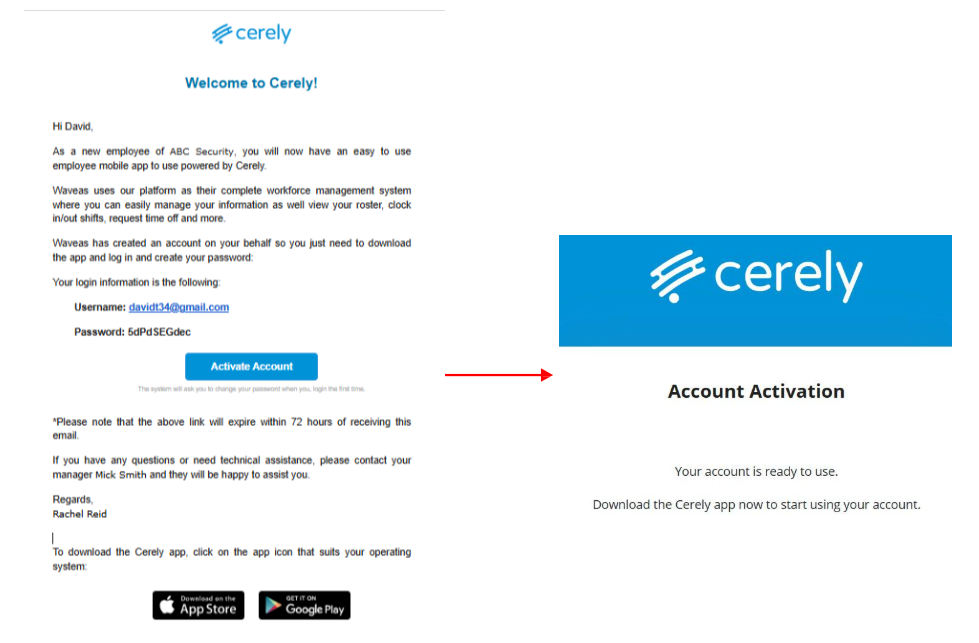
6. This confirms that your profile has been successfully activated and is ready to use
Please Note:
The Activate Account link expires after 72 hours. If expired, you will need to contact your manager to resend the invitation.
If you see a "Token Invalid" message, this means your invitation may have already been activated or has expired.
Contact your manager to confirm or request a new invitation.
Was this article helpful?
That’s Great!
Thank you for your feedback
Sorry! We couldn't be helpful
Thank you for your feedback
Feedback sent
We appreciate your effort and will try to fix the article