To access and manage your personal information in the Cerely app, follow these steps:
Viewing Your Details
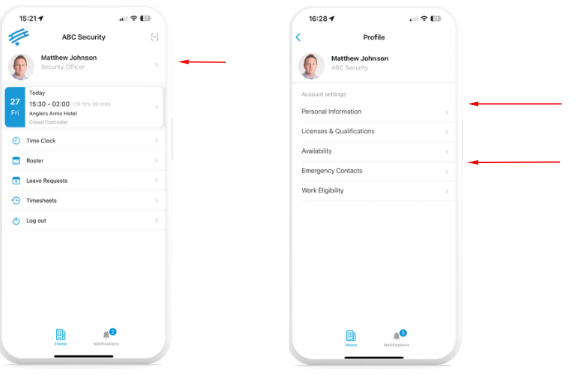
1. From the Cerely home screen, tap your name at the top of the screen
2. This will open your Profile Page, where you can view:
Personal Details
Employment Information
Licenses, Qualifications, and Visa Status
Note: To update your licenses, qualifications, or visa eligibility, please email: (add company email address)
Update Personal Details
3. From the Profile screen, select ‘Personal Information’
4. Tap ‘Edit’ to make changes to your:
Email address
Phone number
Address or other personal info
5. Make the required changes and tap ‘Save’
Update Emergency Contact
6. From the Profile screen, select ‘Emergency Contact’
7. Tap ‘Edit’ to update your next of kin or emergency contact details
Enter:
Full name
Relationship
Phone number
Important: Your emergency contact must not be yourself. It should be someone we can reach in case of an emergency.
Was this article helpful?
That’s Great!
Thank you for your feedback
Sorry! We couldn't be helpful
Thank you for your feedback
Feedback sent
We appreciate your effort and will try to fix the article